
TurboViewer Pro4.2 - Get APK
You'll be able to download in few seconds.
Publisher Description
THE FASTEST, EASIEST WAY TO VIEW, MARKUP, AND SHARE 2D/3D DRAWINGS AND DOCUMENTS
The TurboViewer family of lightning-fast view, markup, and sharing apps are powerful and innovative... the first mobile DWG™ viewer and markup that support both 2D and 3D.
Built from the ground up -- and specifically optimized for smart devices -- TurboViewer sets the standard for mobile AEC viewing and markup.
__________________________________________________
There are three TurboViewer apps:
• TurboViewer (FREE)
• TurboViewer X ($6.99)
• TurboViewer Pro (Limited time special $19.99)
__________________________________________________
Highlights include [differences designated below]:
MARKUP FEATURES:
• AutoShapes: Drawing rough shapes with your finger automatically refines to accurate geometry
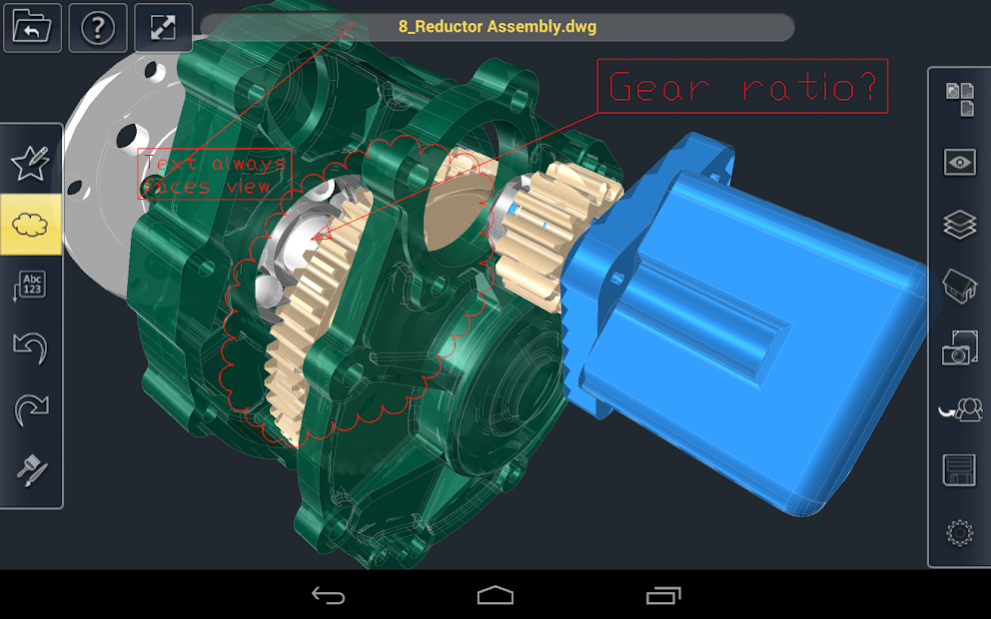
• Redmark tools: Markup 2D and 3D objects using line, circle, rectangle, revision cloud, text, rectangular text box and leader
SHARING FEATURES:
• Contact Management built on top of native Contacts (so all current contact info is available)
• Organize contacts into Groups for easy "one tap" sending of shared drawings or documents to large design and construction teams
VIEWING FEATURES:
• Lightning-fast 2D and 3D environment
• Smooth multi-touch navigation; Pan, zoom, and 3D orbit effortlessly around document
• Hidden line, shaded, and wireframe viewing
• Isometric view
• AutoCAD® SHX font support - Localized or custom SHX fonts
• TrueType font support - Improved visual fidelity with native TTF font file support
• Option to use default or model lights (if any in drawing)
• Option to render both inside and outside model (force two-sided rendering)
• Supports AutoCAD linetypes - Maintain visual fidelity as intended
• [Pro] Realistic (materials), x-ray, gray scale, and shaded without outline
• [Pro] Adjust edge color range from white-gray-black
• [Pro] Adjust x-ray transparency factor
• [Pro] Custom perspective view - View 3D models in realistic perspective angles (human eye perspective or specify custom camera lens sizes in mm)
• [X and Pro] Layer Manager - Layer view manager to turn layers on/off, invert layers
• [X and Pro] Layout support - View model space and paper space layouts
FILE MANAGEMENT:
• Create sub-folders
• Cut/Copy/Paste/Rename files and folders
• Search files and folders by name, size, and date
• Sort by name, size, and date (ascending or descending)
• Send files to other apps using copy, AirDrop, Message, and Mail
• Diagnostic for missing xref and fonts
CUSTOMIZED USAGE:
• Restore saved AutoCAD views - Quickly display the best vision of your design
• Tactile sound feedback - Sound confirmation for button and UI item selection
• Autosense for 2D or 3D drawings - Option to automatically set appropriate gesture navigation of a drawing or model
• Option to use two fingers to 3D rotate/tumble or constrain orbit
• Unique time-savers - Able to navigate full-screen preview during file load; Cancel errant file load
• [Pro and X] Banner free
FORMATS, LOCALIZATION, AND SUPPORT:
• 2D and 3D CAD Drawing support (AutoCAD® and AutoCAD LT®, TurboCAD, and DoubleCAD), DXF, TCW, DCD, and 2CD)
• Cloud conversion server
• Import/Export support for mail, Web downloads, Dropbox, Box, etc.
• Online wiki help system
• Forum support
• [Pro] Other popular AEC file formats translated in the cloud including 2CD, 3DM, 3DS, ASAT, CGM, DCD, DGN, EPS, FCW, IGS, OBJ, PLT, SAT, SKP, STEP, STL, STP, TCW, and WRZ
• [Pro] 12-month premium telephone support
• [Pro] 12-month premium email support
Note: Trouble with TurboViewer? Please visit our support forum or contact us directly, problems may be easily resolved by our support team!
About TurboViewer Pro
The company that develops TurboViewer Pro is IMSI/Design, LLC. The latest version released by its developer is 4.2.
To install TurboViewer Pro on your Android device, just click the green Continue To App button above to start the installation process. The app is listed on our website since 2018-04-10 and was downloaded 0 times. We have already checked if the download link is safe, however for your own protection we recommend that you scan the downloaded app with your antivirus. Your antivirus may detect the TurboViewer Pro as malware as malware if the download link to com.imsi.TurboViewer.Pro is broken.
How to install TurboViewer Pro on your Android device:
- Click on the Continue To App button on our website. This will redirect you to Google Play.
- Once the TurboViewer Pro is shown in the Google Play listing of your Android device, you can start its download and installation. Tap on the Install button located below the search bar and to the right of the app icon.
- A pop-up window with the permissions required by TurboViewer Pro will be shown. Click on Accept to continue the process.
- TurboViewer Pro will be downloaded onto your device, displaying a progress. Once the download completes, the installation will start and you'll get a notification after the installation is finished.
Program Details
System requirements
Download information
Pricing
Version History
version 4.2
posted on 2018-04-10
Version 4.2
. Additional Android 8.0 device compatibility updates
. Miscellaneous optimizations, stability, and bug fixing
version
posted on 2015-01-30
Version 3.5.3,• Additional Android device compatibility updates,• Miscellaneous optimizations, stability, and bug fixing
version 1.2.1
posted on 2013-02-25
Several fixes and updates
Disclaimer
External Download
We do not host TurboViewer Pro on our servers. We did not scan it for viruses, adware, spyware or other type of malware. This app is hosted by Galad and passed their terms and conditions to be listed there. We recommend caution when installing it.
The APK Download link for TurboViewer Pro is provided to you by apps112.com without any warranties, representations or guarantees of any kind, so access it at your own risk.
If you have questions regarding this particular app contact the publisher directly. For questions about the functionalities of apps112.com contact us.
